Showing posts with label Offer Zone. Show all posts

Thursday, 3 August 2017

Student Who Claimed Google Job Being Investigated In Chandigarh

Image result for Student Who Claimed Google Job Being Investigated In Chandigarh
A teenager falsely claimed to have been hired by Google at a package of Rs. 1.44 crore, prompting the Chandigarh Education Department to hold an inquiry into the matter.
GMSSS principal Indra Beniwal told PTI today, "I have submitted all the necessary documents and proof to the Director, Education who has ordered an inquiry."
Harshit Sharma, who completed his 12th standard with IT stream last year from the government school here, hogged the limelight after claiming to have been hired by tech giant for graphic designing.
Public Relations Department, Chandigarh Administration, had on July 29 even issued an official release about it after the school principal sent the department Sharma's "achievement" details.
However, his claims were found to be fake after Google reportedly denied hiring him.
"Harshit's parents have accepted that their son has committed a mistake (by claiming to have been selected by Google)," Ms Beniwal said.

However, she said the school authorities should have verified the claims before sending his details to the department for issuing a press note.
"We should have verified the documents," Ms Beniwal said. She said the UT education department has ordered an inquiry into the matter.
Beniwal said she had not been able to talk to Sharma since this matter came to light. "His mother told me that he was advised by doctors take rest as he was unwell," she said. Sharma hails from Mathana in Haryana's Kurukshetra district.
The press note issued by the department had said, "A student of GMSSS-33D, Chandigarh, Class 12 (IT) stream, Harshit, has been selected for graphic designing by Google. He will be trained for graphic designing for an initial period of one year and will receive a stipend of Rs. 4 lakh per month." "After completion of his training he will get a remuneration of Rs. 12 lakh per month. He went for an online interview through video conferencing and was selected on the basis of posters designed by him while studying in class 12 under the supervision of his teachers," it had said.
"His achievements will act as a morale booster for other students and they will be inspired to make forays into this field," the release had said.

Stay updated on the go with The Hans India News App. Click for Android / IOS download it for your device.
Raksha Bandhan 2017: BSNL launches 'Rakhi pe Saugat' tariff plan with lucrative data and calling benefits

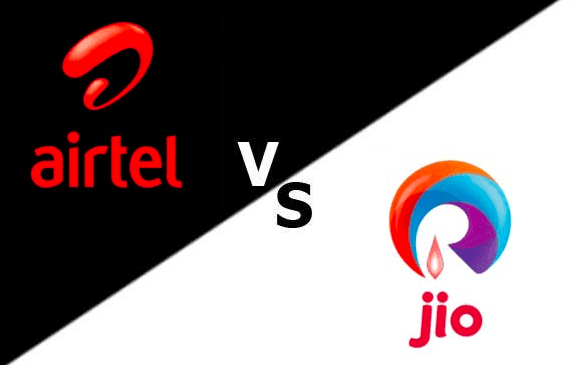
Airtel vs Reliance Jio: Which network is faster in India?
Image result for Airtel vs Reliance Jio
State-run Bharat Sanchar Nigam Ltd (BSNL) has launched a special 'Rakhi pe Saugat' tariff plan with lucrative data and calling offers ahead of the Raksha Bandhan festival.

The new 'Rakhi pe Saugat' pre-paid pack costs Rs 74 and offers 1GB high-speed 4G data per day and unlimited local and STD calls via net. Subscribers will also get 74 minutes off-net talktime. It comes with five days validity.

Interested customers can go nearest BSNL currency recharge booth and get the new data pack. It will be available starting August 3 and will conclude on August 12. The company has also increased data benefits and also talk time in current tariff plans of Rs 189, Rs 289, and Rs 389.

"Maintaining its tradition BSNL is offering such cheapest tariffs on festivities," RK Mittal, Director (CM) BSNL Board said in a statement.

Lately, the competition between incumbent telecom players such as Airtel, Vodafone, Idea, BSNL and the new entrant Reliance Jio has led to a huge price war. In their bid to mitigate mass migration and outrank the rivals, they are risking low returns by launching low-tariff plans with lucrative data benefits.

BSNL launches Rs 74 'Rakhi pe Saugat' offer with unlimited calls, 1GB Data per day and more benefitsBSNL via Twitter
Jio Phone effect: Idea mulls launching own mobile brand

Now that Reliance Jio Phone (Rs 1,500) is slated to hit stores in September, established players have begun talks with mobile-makers for joint ventures and also some are merging to consolidate their market share.

For instance, British major Vodafone and Aditya Birla-owned Idea are officially in the final stages of merger and they have also initiated talks with OEMs (Original Equipment Manufacturers) to build their own-branded mobile handset, but with slightly expensive price-tag of around Rs 2,500.

Also read-Reliance JioFiber vs BSNL: State-run telecom major launches 1,000 mbps broadband internet service

"We are looking at how much features can be brought down, how much bill of material can be brought down (to reduce prices) and test consumer response in each of these," Himanshu Kapania, the managing director of Idea Cellular Limited, had said in a statement last month.

Unlike Jio Phone, which offers very limited features, Idea-Vodafone will offer the freedom of choice to the customers.

People will be able to select their operator of his/her choice and also access popular applications like Google, Facebook and WhatsApp, among many more apps.

Follow us @IBTimesIN_Tech on Twitter for latest updates on telecom tariff plans.

BSNL offering 1 GB data along with talk-time at Rs. 74 for 5 days

Telecom operator BSNL has now started a new offer that will give prepaid users both free data and talk time. The relatively low-priced offer comes as a combo voucher of Rs. 74. For this price, users get 1 GB free data as well as Rs. 74 worth of talk time for other networks. Validity for the plan is just 5 days. Further moving up the ladder, the telco has other combo vouchers priced at Rs. 189, Rs. 289, and Rs. 389 as well that offer more talk time along with the same 1 GB data. The offer will come in to effect from August 3 and end on August 16. The low priced combo voucher has been started keeping in mind the festive occasions coming ahead to provide more freedom to its prepaid users.


“Maintaining its tradition BSNL is offering such cheapest tariffs on festivities,” said Shri R.K.Mittal, Director (CM) BSNL Board. The offer is applicable for 12 days with effect from August 3.

Monday, 10 April 2017

How to Monetizes​ UC We Media News Post And Earn Money

Source of income
Reward
The platform will have various reward programs. As long as you meet the requirements of the program, you will receive considerable cash rewards.

Advertisement
The income from advertisements depends on the number of turnover you receive.
Application requirements
1. You have registered for at least 7 days.
2. You have successfully published at least one article achieving more than 2000 views.

Special Reward for New Registered Account of UC We-Media Production

Campaign Terms & Rules
Partners can get a Rs300 bonus under conditions of:


• The campaign is valid only within first 7 days after registration;
• The contributor need to apply for this campaign;
• The account has successfully published at least one article with more than 1000 views;
Eg. If you registered on 9th Dec, and apply for the bonus on 12th, you still need to finish at least one qualified article between 12-15th Dec;
• The article has to be published using our edit platform, articles synced through the RSS are excluded;
• We’ll inform you the next day by an announcement in WeMedia manage panel when you’re qualified. You’ll need to complete your banking information before cash withdraw;
• We reserve the right to cancel the reward if we find violations like unauthorized copy, duplicated content, or inappropriate content like politically sensitive or offensive to any religion or encouraging or promoting abuse;
• The entrance for new account bonus will be closed post 7 days of registration.

Currently, we can only support USD currency in the panel, we’ll introduce the visible equivalent amount in local currency very soon. You’ll be able to withdraw in your local currency.

However, there’s a minimal withdrawal limit of 50 USD due to current banking guidelines. We encourage & appreciate your content, stay tuned and we’ll bring more campaigns to help you earn even more!
Video Guide

Thursday, 6 April 2017

Special Reward For New Registered Account Of UC News

Campaign Terms & Rules:
Partners can get a Rs300 bonus under conditions of:

• The campaign is valid only wihin first 7 days after registration;
• The contributor need to apply for this campaign;
• The account has successfully published at least one article with more than 1000 views;
Eg. If you registered on 9th Dec, and apply for the bonus on 12th, you still need to finish at least one qualified article between 12-15th Dec ;
• The article has to be published using our edit platform, articles synced through the RSS are excluded;
• We’ll inform you the next day by announcement in WeMedia manage panel when you’re qualified. You’ll need to complete your banking information before cash withdraw;
• We preserve the right to cancel the reward if we find violations like unauthorized copy, duplicated content, or inappropriate content like politically sensitive or offensive to any religion or encouraging or promoting abuse;
• The entrance for new account bonus will be closed post 7 days of registration.

Currently we can only support USD currency in the panel, we’ll introduce the visible equivalent amount in local currency very soon. You’ll be able to withdraw in your local currency.

However, there’s a minimal withdrawal limit of 50 USD due to current banking guidelines. We encourage & appreciate your content, stay tuned and we’ll bring more campaigns to help you earn even more!

Sunday, 4 December 2016

Airtel Free 1GB 4G Data Working trick 2017

How to Getting Airtel 1 GB 4G data by Giving Miss Call:-


• Give a Miss call to 52122 from your AirTel Mobile.
• Now if you are eligible then you will receive a successful message, You got 1 GB 4G data for 90 days”.
• To check data balance dial a used *121*2#
Important: To get the benefit of free data balance , use  LTE or 4G mode only. Otherwise, your  main balance will be deducted.

Note: In order to avail this free 4G data offer you need to upgrade your Airtel 3G sim to Airtel 4G SIM.

Tuesday, 15 November 2016

How to get Google AdSense Approval for your Blogger

Advertise on your blog

With Blogger, you can make money with your blog by showing AdSense and other ads on your pages.
6391476_orig

Sign up for AdSense to show ads

  1. Sign into Blogger.
  2. Click the blog you want to run ads on.
  3. In the left menu, click Earnings.
  4. Click Sign up for AdSense. If you don’t see the button, it means your blog might not qualify for AdSense. Check the AdSense eligibility checklist to find out why.
  5. Fill out the form with your Google Account or create a new one.
Note: It can take at least 48 hours for your application to be reviewed.

Show ads between your posts

  1. Sign into Blogger.
  2. Click the blog you want to show ads on.
  3. In the left menu, click Layout.
  4. In "Blog Posts" under "Page Body," click Edit .
  5. In the window that appears, check the box next to "Show Ads Between Posts."
  6. Choose the ad format, colors, and how often the ads should appear.
  7. Click Save

Show ads in the columns

  1. Sign into Blogger.
  2. In the left menu, click Layout.
  3. Click Add a Gadget.
  4. Select the AdSense gadget and click Add Add.
  5. Configure AdSense and click Save.
  6. In the top right, click Save arrangement.

Show mobile-friendly ads

You can use AdSense page-level ads to:
  • Place an ad on the edge of readers' mobile or tablet screens
  • Add a full-screen ad on every page
To set up your ads:
  1. Sign into AdSense.
  2. Choose which types of page-level ads you want to use.
  3. To see how the ads will look, use a phone or tablet and add #googleads at the end of your blog’s URL.

Show ads from other ad services

  1. Sign into Blogger.
  2. Click the blog you want to show ads on.
  3. In the left menu, click Layout.
  4. In the area where you want to place the ads, click Add a gadget.
  5. In the window that appears, under "Basics," find HTML/Javascript and click Add Add.
  6. Enter a title (optional).
  7. Copy and paste the code from the ad service website into the content section.
  8. Click Save

See your Blogger earnings report

  1. Sign into Blogger.
  2. Click the blog you want to see a report for.
  3. Click Earnings.
  4. Click Visit AdSense for details of my earnings.

What to do if AdSense isn’t turning on

  1. Sign into Blogger.
  2. On the Blogger dashboard, click the blog you want to put AdSense ads on.
  3. In the left menu, select Layout.
  4. Under the AdSense gadget, click Edit.
  5. Click Save.
  6. Repeat Steps 4 and 5 for every AdSense gadget on your blog.
  7. At the bottom of your "Blog Posts" gadget, click Edit.
  8. Click Save.
  9. In the top right, click Save arrangement.
  10. To check that your account is still active, go to AdSense.

Wednesday, 31 August 2016

how to transfer Mobile balance in all network

2432965605


How To Transfer Balance from Airtel to Airtel

airtel-sim-250x250
  1. Open your phone dialer and Just Dial *141#
  2. A Menu will pop-up on your Mobile phone like this.
  3. 1) Share Talk time. ...
  4. Select “Share Talk Time” which is the 1st option available in the menu.
  5. Enter “1” to “Share talk time”, and press the “Send” button.


How To Transfer Balance from Idea to Idea

1280px-idea_cellular_logo-svg
  1. Open Phone Dialer.
  2. Dial *151* local idea number to which you are transferring amount*Amount you are transfering#


How to Transfer Balance from Vodafone to Vodafone

vodafone-logo-on-sim-card
  1. Open Phone Dialer.
  2. Dial *131* Amount*<Mobile Number>#


how transfer balance reliance to reliance

reliance
  1. Dial *367*3#
  2. Enter *312*3# and mobile number.
  3. Enter balance amount.
  4. Enter PIN. Default PIN is 1.
  5. You're done.


To transfer balance from Tata Docomo to Tata Docomo

index
  1. You have to send a message to transfer your balance from Tata Docomo to Tata Docomo mobile number.
  2. Open your Messaging and type BT<space>Mobile Number.
  3. And send it to 54321.
  4. And Rs.5 will be transferred.


How transfer balance Aircel to Aircel

images
  1. Please dial *121*666#
  2. then follow the instructions. Balance transfer is available only for Aircel prepaid customers. Count and Value limits on Balance transfer apply on transactions, at discretion of Aircel.


How to Transfer Balance from BSNL to BSNL

BSNL.png
  1. Minimum Balance Should be: Rs. 200/- in your phone.
  2. Transfer amount should not be less than Rs 10.
  3. Transfer can be send in same circle like AP to AP, Kerala to Kerala, Punjab to Punjab, Haryana to Haryana, etc.
  4. There should be at least Rs.


Monday, 16 May 2016

What is Li-Fi technology ? (how to Geting Highly Speed Internet

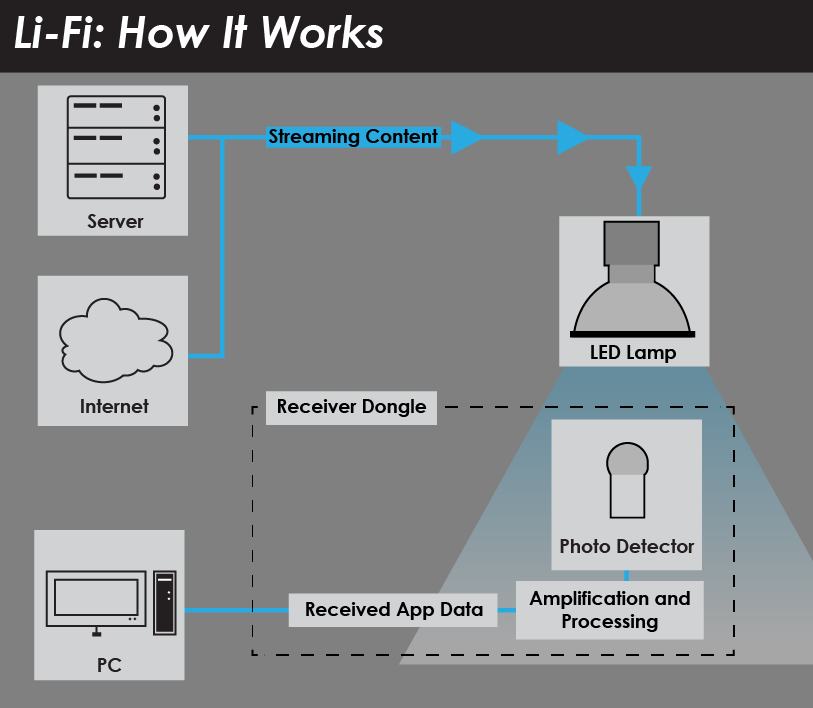
Li-Fi technology is a ground-breaking light-based communication technology, which makes use of light waves instead of radio technology to deliver data.

Screenshot (2).png

Li-Fi can compensate as the radio spectrum becomes overloaded

Using the visible light spectrum, Li-Fi technology can transmit data and unlock capacity which is 10,000 times greater than that available within the radio spectrum.
The visible light spectrum is plentiful, free and unlicensed, mitigating the radio frequency spectrum crunch effect.

The future internet

Li-Fi technology will in future enable faster, more reliable internet connections, even when the demand for data usage has outgrown the available supply from existing technologies such as 4G, LTE and Wi-Fi. It will not replace these technologies, but will work seamlessly alongside them.
Using light to deliver wireless internet will also allow connectivity in environments that do not currently readily support Wi-Fi, such as aircraft cabins, hospitals and hazardous environments.
Light is already used for data transmission in fibre-optic cables and for point to point links, but Li-Fi is a special and novel combination of technologies that allow it to be universally adopted for mobile ultra high speed internet communications.

A dual use for LED lighting

The wide use of solid state lighting offers an opportunity for efficient dual use lighting and communication systems.
Innovation in LED and photon receiver technology has ensured the availability of suitable light transmitters and detectors, while advances in the modulation of communication signals for these types of components has been advanced through signal processing techniques, such as multiple-input-multiple-output (MIMO), to become as sophisticated as those used in mobile telecommunications.

An integrated communication solution

Li-Fi technology is being developed into a ubiquitous systems technology, consisting of application specific combinations of light transmitters, light receivers including solar cells, efficient computational algorithms and networking capabilities that can be deployed in a wide range of communication scenarios and in a variety of device platforms.

How Li-Fi Technology Will Make Wi-Fi Nearly Obsolete

In the near-future, you may find yourself looking for the nearest LED light to connect the internet.
Researcher Harald Haas from the University of Edinburgh has made it possible to transform LED light into an electrical signal that can provide high-speed data streaming. 
Receive a Complimentary Network Consultation
This means that pedestrians walking down a street illuminated with LED lights could very well be able to surf the internet without interruptions. Public infrastructure like hospitals, police stations, and libraries that utilize LED as their primary light source could easily be able to provide internet users with Li-Fi connections.
lifi_environment
Researcher Harald Haas who works from the Alexander Graham Building states that “All the components, all the mechanisms exist already…You just have to put them together and make them work”. If his optimism proves true, you might be searching for the nearest Li-Fi hotspot to connect to the internet.
During the IEEE Phototonics Conference this past October, members of the consortium were able to “create a system that could both send and receive data at aggregate rates of 100 megabits per second. When transmitting in one direction only, they reached a rate of 155Mb/S. [They have also] created a better LED, which provides a data rate close to 4 gigabits per second operating on just 5 milliwatts of optical output power and using high-­bandwidth photodiodes at the receiver.”
How Li-FI- Works
In his 2011 Ted Talk, the researcher highlights that we “have more than five billion [mobile devices]… [and] transmit more than 600 terabytes of data every month”. Since radio waves are scarce and expensive, the researcher suggests migrating to the visible light spectrum for wireless communication. The visible light spectrum is several times wider than the radio wave spectrum and would allow Li-Fi to offer faster connections than Wi-Fi.
These advancements however, do not entail that Li-Fi will replace Wi-Fi technology. The new technology comes with limitations. Physical barriers that block a direct light source can interfere with a connection and wireless communication in the dark is practically impossible.
The accelerated performance of Li-Fi exhibits the same downsides that 802.11ad wireless connections experiences–both modes of connections are fast but experience a limited physical range of a few meters. Therefore, Li-Fi will work alongside with Wi-Fi networks in the same way that 802.11ad wireless connections will work in conjunction with 802.11n connections.
Picture_of_Prof._Harald_Haas
http://phys.org/news/2012-10-li-fi-edinburgh-prof-seeds.html
IEEE spectrum reveals that “Haas…expects LEDs to evolve past just being light sources, much the same way the cell phone evolved from a communications device to a mobile computer. “In 25 years, every light bulb in your house will have the processing power of your cell phone today,” he says. Haas envisions that illumination will just be one of the many features that LED will offer.
It seems that the future of the internet will bring a myriad of ways to connect to the internet. Elon Musk announced just last week that his latest endeavor includes launching satellites that will provide “unfettered internet access to the masses”.
Would you utilize an LED internet connection?
Let us know what you think! Leave us a comment below.

Friday, 6 May 2016

Make WhatsApp Free For Lifetime only for Android

Whatsapp

1: Uninstall whatsapp,if your trial version is finished, or you want
to extend it for a year.

2: Go to gmail application and
create a new gmail id.

3: Once you have made it,wait for some time (it totally depends on
your connection speed,ideally you
should wait for 15-20 minutes)
4: Go to google play, click on the menu button of your android and choose “Account Settings”.
5: Once you have done this,you just need to choose the new gmail
account, you just created, and download whatsapp once again.
6: Now open whatsapp, and sign into your whatsapp account…
Step 7-Enjoy!!
Note:- This way you will make it free for one year,to make it free for
lifetime, you will have to apply this trick once every year.

Sunday, 8 November 2015

IDEA FREE INTERNET WITH OPERA HANDLER OCTOBER 2015

1. Go to phone settings>>network settings>>APN> New apn
Proxy : server4.operamini.com
or
141.0.11.253
Port: 80
Apn: internet
2. now download latest opera handler - click here to download
3. open opera handler and edit as follows
Give Proxy Type as: HTTP
Enter Proxy Server:
http://111.93.115.205/TnC.aspx
or
http://111.93.115.205/s/home.aspx?splid=9326&mt=jb%3D%2F
4. Now save settings and start enjoying free unlimited browsing and downloading.

AIRTEL UNLIMITED WORKING 3G TRICK DIWALI SPECIAL BLAST NOVEMBER 2015

Hello Guys Today m back with a rocking airtel
unlimited direct trick working fine in Tamilnadu & Many States
without wasting so much time going to post that trick
PC Or Android
                                     Follow This Steps Very Carefully :-
1.Open--- http://one.airtel.in/iportal/index.html
---Using Any Browser In PC or Android
In Android
Opera Mini (Not Recommended)
Android Dafault Browser (Recommended)
2.Once The Page Is Opened Scroll Down
3.And look For The Line--
Get This songs on Wynk Music. Listen
Now >
4.Click / Press on Listen Now
5.A pop up window Appers on Bottom of
the PAGE
6.Click / Press on ACTIVATE
7.Once the Process is Completed /
Activated
------MOST IMPORTENT PART------
8.VERY FAST Try typing GOOGLE.COM in
Adress bar
Or Any site you prefer.The page might
Open or may not...Don't WORRY
9.NOW here's the HACKED STARTS
within 30sec--1min if google page or any
site doesn't open....
10.DISCONNECT internet and IMMEDIATELY
Connect it
11.Try Google.com
12.BOOOM BOOM BOOM You Officially
HACKED

Vodafone Diwali Offer Gives Subscribers 100MB of Free Data

  • Vodafone India has introduced a special Diwali offer that gives users 100MB of free data on the day of the festival lights - November 11.
  • To avail of the Vodafone Diwali offer,
  • subscribers need to SMS 'Diwali' to 199.
  • The move is ostensibly to support a 'silent Diwali', and the company in an emailed statement said the free data could be used to send Diwali e-greetings and browse the Web. The offer is available for both prepaid and postpaid subscribers.
Speaking about this gesture, Sunil Sood - Managing Director and CEO, Vodafone India said, "AtVodafone, we are driven with the singular objective of delivering superior experience to our customers. Data is increasingly driving usage pattern, more so during important festivals like Diwali. Offering free data on Diwali is our way of gratifying our valued 188 million customers for their love and trust in the brand and our service experience. We take this opportunity to wish all our customers Happy Diwali and will continue to delight them with such differentiated offerings in the days to come."
Vodafone India in late October announced it will launch its 4G services in Kolkata by the end of 2015.Earlier in October, Vodafone said it will launch 4G services in the Delhi-NCR region by December. The company had earlier announced December as the 4G services launch period for its Mumbai and Kerala circles as well.
Vodafone had first announced a December rollout time-frame in August, following Airtel's launch of its 4G services the same month.

Friday, 24 July 2015

How to Use Facebook Without Internet

Hey, Now you can Use Facebook without the Internet. Fonetwish is an USSD based interactive service which brings the power of the internet to every mobile phone. Fonetwish provides access to facebook from any mobile phone without the requirement of any data(internet) connection. Just dial *325# from your mobile phone and get started, fetish provides all the major features of facebook-like status update, wall post, friend requests, notifications along with the above fetish provides push notifications an innovative new feature by which your facebook notifications are pushed into your mobile handset automatically as and when they are generated. So, the next time when you want to update your status or post on a friends’ wall no need to worry about overpriced SMS’s or a Data Connection. Just dial *325# from your mobile phone and get started.


1) What is Facebook by Fonetwish?
Facebook by Fonetwish a first in the world service that allows users to access their Facebook accounts without going on the Internet.

2) How do I use Facebook by Fonetwish?
Facebook by Fonetwish can be used by dialing *325# from their mobile phone. Once dialed, a menu will appear on your screen. Enter your Facebook username and password to log on!

3) Is it free? If not, how much does it cost?
Updating your status is completely free, but using other features, such as posting on a wall, checking notifications, and adding friends are not free. Facebook by Fonetwish is a subscription service that charges Rs. 1/ day for unlimited usage.

4) How do I subscribe? How do I unsubscribe?
Fonetwish will automatically ask you for subscriptions when you access the premium features of the service. We will send you an SMS with the subscription details. To unsubscribe, just dial *325*22# from your mobile.

5) Does it have roaming charges?
No, Facebook by Fonetwish does not have any additional roaming charges. The service is available anywhere, anytime!

6) Does it work on all phones? If not, which ones?
We designed the service to work on all types of mobile phones, from a simple Nokia 3100 to smartphones like a Blackberry and an iPhone.

7) Is there a character limit for using the service?
Yes, the character limit is 140 characters.

8) Can I use the service on all operators anywhere in the world?
Currently, Facebook by Fonetwish works with Airtel, Aircel, Idea, Videocon, Loop Mobile and Tata Docomo in India.

9) Where do I report problems and give feedback?
We would love to hear from you, just drop a mail to Facebook by Fonetwish at Durgesh0496@gmail.com Updating your status is completely free, but using other features, such as posting on a wall, checking notifications, and adding friends are not free. Facebook by Fonetwish is a subscription service that charges Rs. 1/ day for unlimited usage.

4) How do I subscribe? How do I unsubscribe?
Fonetwish will automatically ask you for subscriptions when you access the premium features of the service. We will send you an SMS with the subscription details. To unsubscribe, just dial *325*22# from your mobile.

5) Does it have roaming charges?
No, Facebook by Fonetwish does not have any additional roaming charges. The service is available anywhere, anytime!

6) Does it work on all phones? If not, which ones?
We designed the service to work on all types of mobile phones, from a simple Nokia 3100 to smartphones like a Blackberry and an iPhone.


And

7) Is there a character limit for using the service?
Yes, the character limit is 140 characters.

8) Can I use the service on all operators anywhere in the world?
Currently, Facebook by Fonetwish works with Airtel, Aircel, Idea, Videocon, Loop Mobile and Tata Docomo in India.

9) Where do I report problems and give feedback?
We would love to hear from you, just drop a mail to Facebook by Fonetwish at 
Durgesh0496@gmail.com

Wednesday, 10 June 2015

Keylogger Tutorial for Any Primium Application

Keylogger is a software program or hardware device that is used to monitor and log each of the keys a user types into a computer keyboard. The user who installed the program or hardware device can then view all keys typed in by that user. Because these programs and hardware devices monitor the keys typed in a user can easily find user passwords and other information a user may not wish others to know about.
Keyloggers, as a surveillance tool, are often used by employers to ensure employees use work computers for business purposes only. Unfortunately, keyloggers can also be embedded in spyware allowing your information to be transmitted to an unknown third party.


 About keyloggers

key loggersA keylogger is a program that runs in the background, recording all the keystrokes. Once keystrokes are logged, they are hidden in the machine for later retrieval, or shipped raw to the attacker. The attacker then peruses them carefully in the hopes of either finding passwords, or possibly other useful information that could be used to compromise the system or be used in a social engineering attack. For example, a keylogger will reveal the contents of all e-mail composed by the user. Keylogger is commonly included in rootkits.

keylogger normally consists of two files: a DLL which does all the work and an EXE which loads the DLL and sets the hook. Therefore when you deploy the hooker on a system, two such files must be present in the same directory.

There are other approaches to capturing info about what you are doing.

    * Some keyloggers capture screens, rather than keystrokes.
    * Other keyloggers will secretly turn on video or audio recorders, and transmit what they capture over your internet connection. 

keyloggers might be as simple as an exe and a dll that are placed on a machine and invoked at boot via an entry in the registry. Or a keyloggers could be which boasts these features:

    * Stealth: invisible in process list
    * Includes kernel keylogger driver that captures keystrokes even when user is logged off (Windows 2000 / XP)
    * ProBot program files and registry entries are hidden (Windows 2000 / XP)
    * Includes Remote Deployment wizard
    * Active window titles and process names logging
    * Keystroke / password logging
    * Regional keyboard support
    * Keylogging in NT console windows
    * Launched applications list
    * Text snapshots of active applications.
    * Visited Internet URL logger
    * Capture HTTP POST data (including logins/passwords)
    * File and Folder creation/removal logging
    * Mouse activities
    * Workstation user and timestamp recording
    * Log file archiving, separate log files for each user
    * Log file secure encryption
    * Password authentication
    * Invisible operation
    * Native GUI session log presentation
    * Easy log file reports with Instant Viewer 2 Web interface
    * HTML and Text log file export
    * Automatic E-mail log file delivery
    * Easy setup & uninstall wizards
    * Support for Windows (R) 95/98/ME and Windows (R) NT/2000/XP 

 Tools: 

Ardamax Keylogger is a keystroke recorder that captures user's activity and saves it to an encrypted log file. The log file can be viewed with the powerful Log Viewer. Use this tool to find out what is happening on your computer while you are away, maintain a backup of your typed data automatically or use it to monitor your kids. Also you can use it as a monitoring device for detecting unauthorised access. Logs can be automatically sent to your e-mail address, access to the keylogger is password protected. Besides, Ardamax Keylogger logs information about the Internet addresses the user has visited.
This invisible spy application is designed for 2000, XP, 2003, Vista and Windows 7.
  • Security - allows you to protect program settings, Hidden Mode and Log file.
  • Application monitoring - keylogger will record the application that was in use that received the keystroke!
  • Time/Date tracking - it allows you to pinpoint the exact time a window received a keystroke!
  • Powerful Log Viewer - you can view and save the log as a HTML page or plain text with keylogger Log Viewer.
  • Small size – Ardamax Keylogger is several times smaller than other programs with the same features. It has no additional modules and libraries, so its size is smaller and the performance is higher.
  • Ardamax Keylogger fully supports Unicode characters which makes it possible to record keystrokes that include characters from Japanese, Chinese, Arabic and many other character sets.
  • It records every keystroke. Captures passwords and all other invisible text.
Other Features:
  • Windows 2000/2003/XP/Vista/Windows 7 support
  • Monitors multi-user machines
  • Automatic startup
  • Friendly interface
  • Easy to install


Perfect Keylogger for Windows 98/2000/XP/Vista and Windows 7 

The latest, improved and most stealth version of Perfect Keylogger is now available only after purchase. To protect the product from abuse and improve its quality for the registered users, we no longer offer the trial version of the latest builds. The localized versions of Perfect Keyloger and 64-bit version are also available after purchase. The last public version is still available, but keep in mind that it's not the latest and may be flagged by security software.

Download Perfect keylogger