Showing posts with label wife hacking tricks. Show all posts

Thursday, 17 August 2017

How To Hack Wifi – WPA & WPA2 Network In Kali Linux Using airodump-ng and aircrack

It is very easy to hack WEP password but very difficult to hack WPA OR WPA2, so now I will explain how to hack WPA & WPA2 passwords easily in Linux based operating system.
By guessing the PIN, the router will actually throw back, whether or not the first four digits (of eight) are correct. Then, the final number is a checking number used to satisfy an algorithm. This can be exploited to brute force the WPS PIN, and allow recovery of the WPA password in an incredibly short amount of time, as opposed to the standard attack on WPA
Requirements:
     1) Kali Linux – Operation System In Your System Or In Your Flash Disk (USB Pendrive)
     2) 4GB or Above Pendrive
     3) Kali Live Boot
     4) Word List –
     5) Wifi networks near by with Excellent Signal to make hacking faster
3) There are many kinds of word lists, so it is better to use 13Gb Word List or 50mb Wordlist, those word lists contain 1 to 10 million word – they are the passwords from all over the world here Are The Links To Download Word lists – One Is Enough, but I will give you few links Click To Download— 13Gb Wordlist Compressed To 4Gb Click Here To Various Wordlists
Procedure: Just follow the commands in the pictures, now open a new terminal and type the following command
========== Hacking Don’t Need Agreements ==========
Just Remember One Thing You Don’t Need To Seek Anyone’s Permission To Hack Anything Or Anyone As Long As It Is Ethical, This Is The Main Principle Of Hacking Dream Thank You for Reading My Post, I Hope It Will Be Useful For You

Wednesday, 19 July 2017

Top Most Android 15 Killer Tricks After Do Rooting Your Android Mobile

Hey, Fellas! You might have rooted your Android device. Now, you might be thinking what next? Right? So today in this trick I will be telling you What To Do After Rooting Android 15 Killer Tricks.
Image result for Whats Do  After Rooting Your Android
As we all know that we have rooted our Android device just for some reasons. We can also say that we have rooted our Android just because we want to expand our RAM? Or any application such as Dolby Atmos on our Android device.
This is something which is really amazing. If you bought any Android device. If you have not rooted your device. Then you have missed really a fan of using Android device.
Most of the times people are confused that after rooting their Android device the warranty might get void or something. But people don't know about the good features of rooting of their Android.
Yes, after rooting your warranty might get void but, after unrooting your Android device you will get your warranty back too. This is something which most of the people’s doesn’t know about it. People’s are confused related to an Android rooting topic.
If you are new and don’t know what is it? What things you can do after rooting your Android device. Some of the killer tricks which you can try with your Android device. Let’s get started with it. 
1 How To Install Dolby Atmos On Your Android Device.
Now, if you are fond of music then this is the best application which you can try with your rooted Android application. Installing the Dolby Atmos on your Android device is easy.
You can easily install it on your Android device which is above 4.3 Jelly bean. This application will work absolutely fine. I have installed this application on my Android and the sound quality is superb.
If you love this tutorial of installing Dolby Atmos on your Android device. You need a custom recovery such as TWRP or CWM recovery on your Android device. We have explained this guide properly, You can follow up this guide easily by clicking on the given link How To Install Dolby Atmos On Your Android Device
After Rooting
2. Build Prop Tweaks For Android Jelly Bean, KitKat & Lollipop Devices
Build Prop is something which is a core of your Android operating system. Why? Just because if you want to increase your Android sound here build prop comes. If you want to add up some extra features on your Android device. Then here build prop comes in the show and does all you’re adding up features.
We have mentioned here the tricks for jelly bean, KitKat, Lollipop. Which is amazing. If you know Android development then you can create your own codes and add up in the Build Prop.
Editing build prop is risky and if you don’t know how to boost up your performance and don’t have known so please stay away. We have shared a proper guide about this tutorial and you can follow up this guide by pressing the given link from here Build Prop Tweaks For Android Jelly Bean, KitKat & Lollipop Devices
Image result for Build Prop Tweaks 
3. How To Increase Battery Life Of Your Android Smartphone
Battery life is something which is important a lot if you are using any Android device. Most of the times people check the battery performance and other features before buying the mobile phone. Nowadays many smartphones are having quick charge feature which allows you to do .ss % charge in some minutes.
There is an application called as green which will save your battery. Basically, greenery stops all the applications which are running in the background and which is consuming all your battery life. If you are using Android 6.0 then you have to allow accessibility. Also, check out full guide from here How To Increase Battery Life Of Your Android Smartphone
Related image
4. How To Flash Custom Recovery/Kernels Using Flashify
Flashify is a tool which helps users to flash the kernel and custom recovery. This is the great tool from which you can do all these settings in a single click. Flash kernel and custom recovery in one click if you have you rooted Android device. Simple easy and fast. We have explained about what is the kernel, recovery and Custom recovery. You can check out the full tutorial from here How To Flash Custom Recovery/Kernels Using Flashify
After Rooting
5. How To Install Viper4Android Fx On Your Android Device
Viper4android fx is a tool from which you can increase the sound of your Android. If you can’t install Dolby Atmos on your Android device. Then you can try this method on your Android device. You just need a rooted Android device. To increase the sound of your Android device. Then this application will do all the settings. You just sit back and reboot your Android device. It is good if you are fond of music then this is something which is amazing and tries on your Android device. But you need to take care while installing this application in your Android. Just check out the tutorial given below How To Install Viper4Android Fx On Your Android Device
Image result for Viper4Android Fx
6. How To Flash Custom ROM On Android Safely
As we all know that Android operating system is been used by many of the people’s around the Developers keep on doing developing the Android. They keep on developing the custom ROM for many operating systems. The best custom ROM is the one which is not having bugs and not having any kind of errors. In this tutorial, we have explained properly that how can you install custom ROM on your Android device. Without any issues and errors. We have explained properly in this tutorial that what is custom ROM, stock ROM and the complete information about all the Android operating. If you are interested in flashing then this is the best guide which you can follow up on your Android device. How To Flash Custom ROM On Android Safely
Image result for how to install custom ROM

7. How To Remotely Turn Off Your Android By Sending an SMS

If you want to Prank your friends then this is the best application. Just because this application will switch off your Android device. Just by sending a simple SMS. You will be able to send a password. This password will be recognized by the application and it will switch off your Android. Best and amazing trick which you can follow up on your rooted Android mobile phone. This is the reason why we are sharing this guide with you. You can follow up this guide from here How To Remotely Turn Off Your Android By Sending an SMS
Image result for Remotely Turn Off Your Android By Sending an SMS 

8. How To Get Unlimited Likes On Instagram

Instagram is the application which is trending a lot in some days. This Company is bought by Facebook. You can share images on Instagram and you will be able to get likes. If you need more likes then you have to get more followers on Instagram. As more the followers and you get the good lines. In this tutorial, we have shared that how can you get more likes on your Instagram account with the help of this application. Images will get more and more likes. But you have to make sure that you don’t get banned using this trick. Follow up this guide from here How To Get Unlimited Likes On Instagram
what to do after root

9. How To Prank Your Friends With Network Spoofer Application

Network Spoofer application is of networking category. Suppose any user is using a WiFi and you want him to browse any site or flip the content of the site. Then this is something best and amazing application which you can try? Why? Just because you can Prank your friends by showing them something which they don’t want to see. Then you can also share some funny images with this application. It is perfect and working absolutely fine in any wifi connection. It is really a fun and a trending topic. We have shared a complete guide to this application have a look here  How To Prank Your Friends With Network Spoofer Application
what to do after root

10. How To Modify WhatsApp Messages Using WhatsHack

This is really one of my best application. Why? Just because you can modify your WhatsApp messages with the help of this. When you will be using this application you need a rooted Android device. You will be able to change the WhatsApp message and also the time too. Usually, I fool my friends with this application and it is really easy to do those settings. Sometimes the application crashes but we have shown you how to do all the settings when your application crashes and a complete guide you can follow up and have a look at the complete guide from here How To Modify WhatsApp Messages Using WhatsHack
Image result for WhatsHack

11. How To Unlock Pattern Lock Without Losing Data On Android

We often search on Google about this topic. What if you forget your mobile phone pattern lock? You might have come in this situation and you might be thinking what to do in this situation. We came up with the tutorial in which we have shown a guide in which you can easily Unlock your Android device that too without losing your phone data. Most of the times people format their devices but with the help of this tutorial, you can do this great tutorial you can unlock it. What you need is a custom recovery installed on your device and all the things will be done by this application. This tutorial is fantastic to have a look at this tutorial from here How To Unlock Pattern Lock Without Losing Data On Android
Related image
 12. How To Install Xposed Framework On Android 6.0 and 6.0.1 Marshmallow
Xposed Framework this is something which a user is in need of this application. why? Just because it is having hundreds of modules which actually do all the customization of your Android device. As we all know Android is getting updated every year so we have shared a complete guide about how can you install those applications on your Android device. You need a custom recovery to flash those zip files and then you will be able to flash that zip file on your Android device. A complete backup is necessary before following this method have a look at this guide from here How To Install Xposed Framework On Android 6.0 and 6.0.1 Marshmallow
what to do after rooting

13. WiFi Kill App – Prank Your Friends WiFi By Killing Their Friends WiFi Connection

WiFi kill application is one of my favorite application why? Just because I always use a public WiFi with the help of this I kill the wifi connections of my friends. They get confused about this application and think what just happened ðŸ˜€ This application stops the wifi connection which is connected to your wifi network or else any application. If you are having a rooted Android application then this is something best and amazing guide which you can follow up. Basically, this application sends the packets that this is the wifi router means your mobile phone. It is something which you should give a try to your rooted device. Have a look at the complete tutorial from here WiFi Kill App – Prank Your Friends WiFi By Killing Their Friends WiFi Connection
After Rooting Android

14. How To Customise Your Android Device With Gravity Box

If you are using an Android operating system which is having vanilla OS. Then this is really a great application. You can do any customization with the help of this application. It is really a great application. You can customize icons, battery bars, status bars and many other kinds of stuff with the help of this application. You can also add up navigation bar which is used in Lollipop and change all those settings. It is a complete package which is really a great and superb thing. Contains about hundreds of settings and you can enjoy a look of Cyanogen Mod on your Android device. Have a look at this tutorial from here How To Customise Your Android Device With Gravity Box
After Rooting Android

15. How To Increase RAM of Your Android Device Using SD /Memory Card

Many of the people encounter this error of shortage of RAM. This is something which comes after your Android device becomes old. After 2 to 3 months your RAM gets the problem. We have explained a great article about how can you increase your Android RAM with the help of the application. Rohesoft RAM expander actually increase your phone RAM with the help of the application. Amazing and really working guide you can follow up have a look at the complete tutorial from here 
How To Increase RAM of Your Android Device Using SD /Memory Card
After Rooting Android

Conclusion:

This is the best trick which you can try on your rooted Android device. This was some killer and amazing 15 tricks you can follow up after rooting your Android device. Isn’t it amazing? Follow up these guides if you face any issues feel free to comment below. Thank you for visiting and keep visiting for more tips and tricks like this. Peace out.

Tuesday, 18 July 2017

How to View Saved Passwords of WiFi Access Points

With multiple WiFi access points saved on your Android device, it is quite normal to forget the security key to a certain network. This article presents a small, handy workaround for the rare instance where you need to view a forgotten password. For instance, your friend needs to connect to the WiFi network you’re currently using on your Android device, he or she asks you for the security key but you just can’t remember it. What do you do? Read on after the jump to find out.
Albeit through a counterintuitive way, the app can help you with finding passwords of your WiFi access points, old or new. This method requires your device to have root access. If it doesn’t, type “root device name” in the search bar above to gain root access on your device using one of our own guides, or you may simply take a look at our comprehensive compilation of Android root guides to see if your device is listed there or not, and if it is, how to gain root access on it.

Also, you’ll need a file explorer that gives you read access to root-level documents. Root Explorer and Super Manager (Professional Edition) includes said feature.


Ø  Navigate to the root directory /data/misc/wifi. If your file explorer opens the SD card (/mnt/sd card) directory by default, press back twice to open the root directory, then navigate to the mentioned path.
Ø  Open the document wpa_supplicant.conf. If you’re using Root Explorer, simply tap the file to open it in a text viewer or hold it (long tap) to open its context menu and select View as text to do the same.
Ø  From within said file, you can view all your saved WiFi access points along with their passwords. Look under the SSID (Access Point Name) of the WiFi network whose password you need to view. The password is written within quotes in the line that says psk=”password”

As evident by the screenshot above, once you open said conf file, you’ll be able to sneak peek into almost every access point that ever got registered with your Android. All you need to do is lookup for the required access point, note down the password displayed under it, key it 
in the password field, and you’re good to go. The above method has successfully been tested on HTC Desire Z (running CM7). Hopefully, we shall soon be introduced to an app that has the propensity to automatically fetch APs from said file, complete with passwords and other relevant settings, and tie them to the present APs with the same titles. Till then, a manual route is the best route!

Saturday, 6 May 2017

Top 10 Best VPN Services Of 2017

VPN, or a virtual private network, helps you to make your online activities more private and anonymous. It can protect you from the prying eyes of hackers and government agencies, which are after your personal information and actions. Some of the best reviewed and trusted VPN services are Private Internet Access, ExpressVPN, and IPVanish. In this list of best VPN services, you can find the qualities of these services, their price, and downloading links.
Image result for VPN

Best VPN Services Of 2017

1. Private Internet Access

Private Internet Access is one of the world’s leading premium VPN services which is based in the USA. If you’re taking your security for granted, it’s time to reconsider your preferences and invest in some reputed VPN service like Private Internet Access. It’s one of the best VPN services that won’t burn a hole in your pocket.
Image result for private internet access vpn
Recommended by many reputed websites and privacy-focused blogs, Private Internet Access can be simultaneously used by up to 5 devices with unlimited bandwidth. It currently supports OpenVPN, PPTP, and L2TP/IPSec protocols. Private Internet Access doesn’t monitor the users or sensor its servers. It has servers located all around the world (more than 3,000 servers), so you don’t need to worry about bad data speed. It also supports BitTorrent downloading and ad-blocking.

Supported Platforms:

Android, iOS, Chrome, MacOS, Linux, Windows

Private Internet Access VPN price and payment method:

For using this anonymous and secure VPN service, you need to spend $6.95/month. If you choose the yearly plan, you’ll need to spend $3.33/month, i.e., $39.95/year. Buying a Private Internet Access subscription can be accomplished using PayPal, credit cards, Google Wallet, OKPay, etc. Bitcoin is also accepted as a mode of payment.

2. ExpressVPN

ExpressVPN is a reputed private internet network service that promised to deliver the best security and private experience. Based in the British Virgin Islands which has no retention laws, ExpressVPN doesn’t keep user logs. It works on the shared IP basis so that a single IP can’t be tracked back to a single user. It also has a kill switch that bars the apps from connecting to the internet if the VPN is disconnected.
Image result for ExpressVPN
As its name suggests, ExpressVPN is known for its speed. With the support for PTP, OpenVPN, and L2TP protocols, ExpressVPN has established itself as one of top VPN services around. They also have a .onion website. This VPN service is great for torrent and P2P downloading as all its servers are optimized for the same. It also has no restrictions on how much you use the services. Another thing, ExpressVPN doesn’t store logs, so you don’t need to worry about that.

Supported Platforms:

Windows, Linux, MacOS, Android, iOS

ExpressVPN price and payment method:

ExpressVPN’s yearly plan, which is also its most popular one, costs $8.32 per month. The yearly plan also comes with 45-days money back guarantee. Being one of the best VPN services around, ExpressVPN allows you to make payment via different modes, including BitCoin.

3. NordVPN

NordVPN, a Panama-based company, is known for its simple-to-use VPN solution with hundreds of worldwide servers located in 57 different countries. Its Double VPN technology encrypts data twice to provide you a better peace of mind. As it follows the zero log policy, no log of user activity or IP addresses is kept.
Image result for NordVPN
For torrent downloading, the majority of NordVPN servers are a good choice. Other servers are optimized for other purposes like streaming, Tor-over-VPN, and double encryption. Using NordVPN, you can connect up to six different devices simultaneously, which is great for a small household.

Supported Platforms:

Windows, Linux, MacOS, Android, iOS

NordVPN price and payment method:

To use NordVPN, you’ll need to spend $5.75 per month if you’re choosing the annual plan. This way you can avail 52% discount. For the monthly plan, you’ll need to spend $11.95 per month. Apart from a credit card, PayPal, and other popular payment modes, you can also choose the Bitcoin payment method.

4. IPVanish

IPVanish, a Florida-based VPN service, is a top VPN service for general users. With more than 750 servers spread across 61 countries, you can rest assured that IPVanish won’t disappoint you with its performance. It is also known for its no log and no ad-injection policy. The website of IPVanish provides detailed instructions regarding the setup process to make the overall process hassle-free.
Image result for IPVanish
IPVanish supports Open VPN, L2TP, and PPTP protocols. Just like most of the other services on this list of best VPN services, you can connect up to five devices with IPVanish. For the BitTorrent downloaders, IPVanish is a boon as it doesn’t restrict P2P downloading. It’s also a great VPN for Kodi users. However, unlike our top recommendation Private Internet Access, IPVanish doesn’t come with ad-blocking.

Supported Platforms:

Android, MacOS, Linux, iOS, Android, Chrome OS, Windows Phone

IPVanish VPN price and payment method:

The best-value IPVanish’s yearly plan costs $6.49 per month. Just in case you wish to go for a single month plan, you’ll need to spend $10. For payment, you can also use BitCoin to remain anonymous. It goes without saying that you can use other methods like Visa, MasterCard, American Express, PayPal, etc.

5. PureVPN

PureVPN is a Hong Kong-based VPN service that’s known for its speed and performance. With its end-to-end encryption and variety of tunneling protocols, PureVPN promises to deliver complete online privacy to its users. It has more than 750 servers spread across 141 countries. Its inbuilt tool chooses the best server based on different factors.
Image result for PureVPN
PureVPN has repeatedly scored great points in speed tests. It also comes with additional add-ons that let you use a NAT Firewall or get a dedicated PC address. PureVPN supports torrent downloading on more than 200 of its servers.

Supported Platforms:

Android, MacOS, Linux, iOS, Android

PureVPN price and payment method:

PureVPN’s 2-year plan costs $2.95 per month. It comes with an attractive 7-days money-back guarantee. If you wish to grab a single month’s plan, you’ll have to spend $11 per month, which doesn’t make much sense. This premium VPN accepts BitCoin payments. You can also select the traditional payment modes like credit card, PayPal, etc.

6. StrongVPN

StrongVPN is based in California and it promises to provide a log-less anonymous internet experience. It has more than 400 servers spread across 24 countries to help you out. You can connect StrongVPN using the popular protocols like PPTP, L2TP/IPSec, SSTP, or OpenVPN. While the users are limited to two devices at a time, the bandwidth is unlimited.
Image result for StrongVPN
There is also an option to scramble the web traffic to make the VPN traffic look like normal traffic. StrongVPN is one of the best VPN services for unblocking US Netflix and Hulu. Its servers support torrent download as well. The setup of StrongVPN is also simple and it comes with good documentation.

Supported Platforms:

Windows, MacOS, Android, iOS

StrongVPN price and payment method:

If you wish to choose the yearly plan of this premium VPN service, you’ll need to spend $5.83 per month. The single month plan costs you $10 per month. Both of these plans have free StongDNS included. Apart from the popular payment methods, anonymity-focused Bitcoin is also available as a payment mode.

7. VyprVPN

The #7 entry on this list of best VPN service providers is VyprVPN. It’s a popular VPN service that claims to be the world’s most powerful VPN. It offers a high level of security and downloading speed, thanks to 700+ servers and 200,000+ different IP addresses.
Image result for VyprVPN
VyprVPN users and manages all of its hardware to ensure end-to-end privacy. It supports PPTP, L2TP/IPsec, and OpenVPN. It also comes with a Chameleon technology for defeating VPN blockades and throttling. It makes it very useful in geographical regions like China where the government has employed strict restrictions.

Supported Platforms:

Windows, MacOS, Android, iOS, Linux

VyprVPN price and payment method:

Just like other top VPN services for accessing blocked websites and anonymity, Golden Frog VyprVPN comes in different plans. The annual plan of VyprVPN, which allows 5 simultaneous connections, costs $6.67 per month. The standard VyprVPN plan with 3 connection support costs $5 per month when billed annually. These plans also come with a 3-day free trial.

8. TorGuard

TorGuard is own by a US-based company and follows the no logs or time stamp policy. It’s a special VPN service for torrenting and P2P file sharing. Please note that it’s not connected to the Tor Browser in any manner. Here, Tor refers to torrent.
Image result for TorGuard
Apart from anonymous VPN service, TorGuard also provides proxy and email service. The VPN service has more than 1600 servers in more than 50 countries. It allows 5 simultaneous connections and unlimited bandwidth. If you need more devices, you can do so by paying $1 per month. TorGuard supports OpenVPN, SSTP, L2TP, and IPsec protocols.

Supported Platforms:

Windows, MacOS, Android, iOS, Linux

TorGuard price and payment method:

If you choose the yearly plan of this excellent VPN service for torrent downloading and safeguarding your privacy, you need to spend $4.99 per month. Going for the single month plan will cost you $9.99. Bitcoin payment method is also supported here.

9. Buffered VPN

Buffered VPN is a Gibraltar-based company, and promises to provide a decent security and no-compromise performance. You can use Buffered VPN and connect up to five devices simultaneously. Its server network is spread across 40 countries and the new servers are being added. It doesn’t store any private logs.
Image result for buffered vpn
Its port discovery feature automatically searches for open ports to run OpenVPN over. It’s a feature that sounds useful for travelers. It should be noted that Buffered VPN doesn’t come with a Kill Switch. It supports BitTorrent traffic and treated equally.

Supported Platforms:

Windows, MacOS, Linux

Buffered VPN price and payment method:

The yearly plan of Buffered VPN costs $8.25 per month and monthly plan costs $12.99 per month. It should be noted that unlike other service providers in this list of best VPN services for anonymity and privacy, Buffered VPN doesn’t support Bitcoin payment mode at the moment.

10. tunnelbear VPN

TunnelBear, the last entry on this list of the best-paid VPN services, is known for its slick interface. It follows the no logs policy and provides good encryption. It provides good download speeds and comes with a kill switch. Moreover, it also works with Netflix.
Image result for tunnelbear vpn
TunnerBear also offers a free VPN service that restricts one to just 500MB data per month. Compared to other premium VPN services, TunnerBear has lower server density; it has servers in 20 countries. It should also be noted that it doesn’t support P2P filesharing or BitTorrent downloading. It also doesn’t come with the inbuilt ad-blocking feature.

Supported Platforms:

Windows, MacOS, Android, iOS, Chrome, Opera

TunnelBear price and payment method:

As said above, TunnelBear VPN comes with a free VPN plan that gives you 500MB of free data every month. The paid plans are of two types. The yearly plan costs you $4.99 per month, and monthly plan costs $9.99 per month. Apart from payment methods like VISA, MasterCard, American Express, etc., TunnelBear VPN can also be purchased by making a payment in Bitcoins.

Editor’s Recommendation:

The first two entries on this list, Private Internet Access, and ExpressVPN, are one of the best reviewed and well-received VPN services. Private Internet Access VPN is known for being affordable and ensuring complete security. ExpressVPN, on the other hand, is known for its speed and performance.

VPN FAQs:

What is a VPN service? How Does it work?VPN SERVER SETUP WORKING
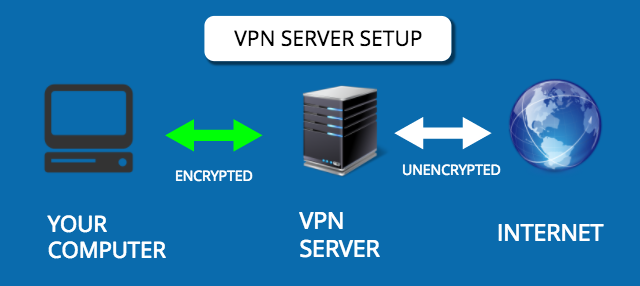
In today’s times, VPN (and other privacy-focused services) are witnessing a great increase in the popularity. VPN, or a Virtual Private Network, is a private and controlled network that lets you connect to the internet. It’s like your private lounge where you can browse the web without any foreign interference. VPNs encrypt 100% of your computer traffic and routes it through the VPN servers located all across the world.
Just in case you’re willing to know about the working of a VPN and its different components, don’t forget to read our dedicated article on the same.

Why should I use a VPN service?

Apart from hiding your internet activity from your internet service provider, a VPN service also lets you bypass the governments’ censorship practices. Here are some major reasons to use a VPN service:Image result for VPN service
  • Hide from your ISP
  • Use public Wi-Fi without risk
  • Bypass government/office internet restrictions
  • BitTorrent/P2P downloading
This isn’t the end. Privacy is your basic right and you shouldn’t hesitate from using methods to secure your digital life. Here’s why you must use VPN for torrent downloading. For more reasons to use a VPN service, read this dedicated article.

Are free VPN services as good as paid ones?


There’s a big reason why all the VPN services aren’t free. Providing VPN services and encryption to millions of users demands hundreds of servers all across the world. You might be promised multiple security features by a free VPN provider, but they might come with restrictions like low speed, limited bandwidth, insecure encryption, and risk of logging your personal information and sessions.